
Typing Gloves
£9.99inc VAT
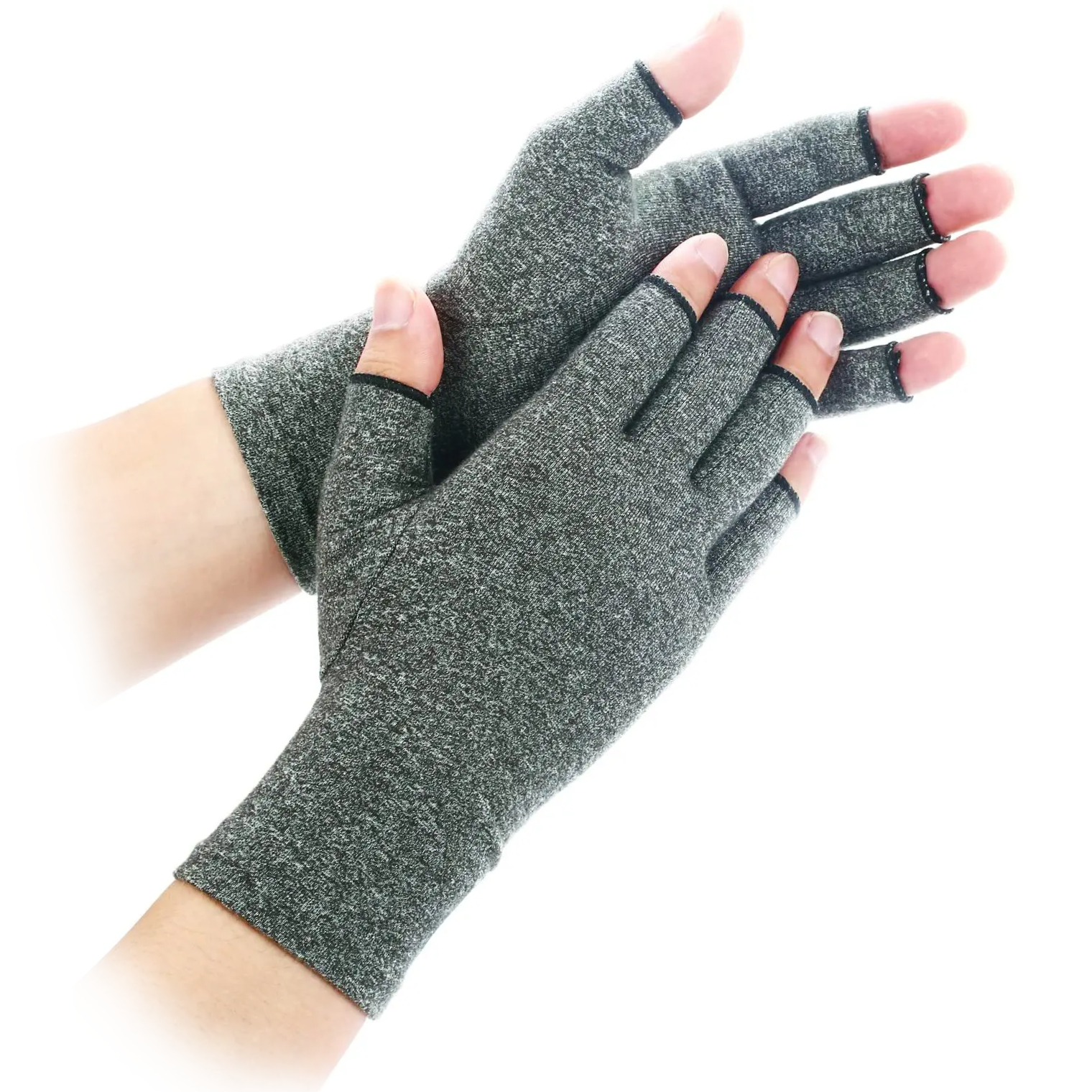
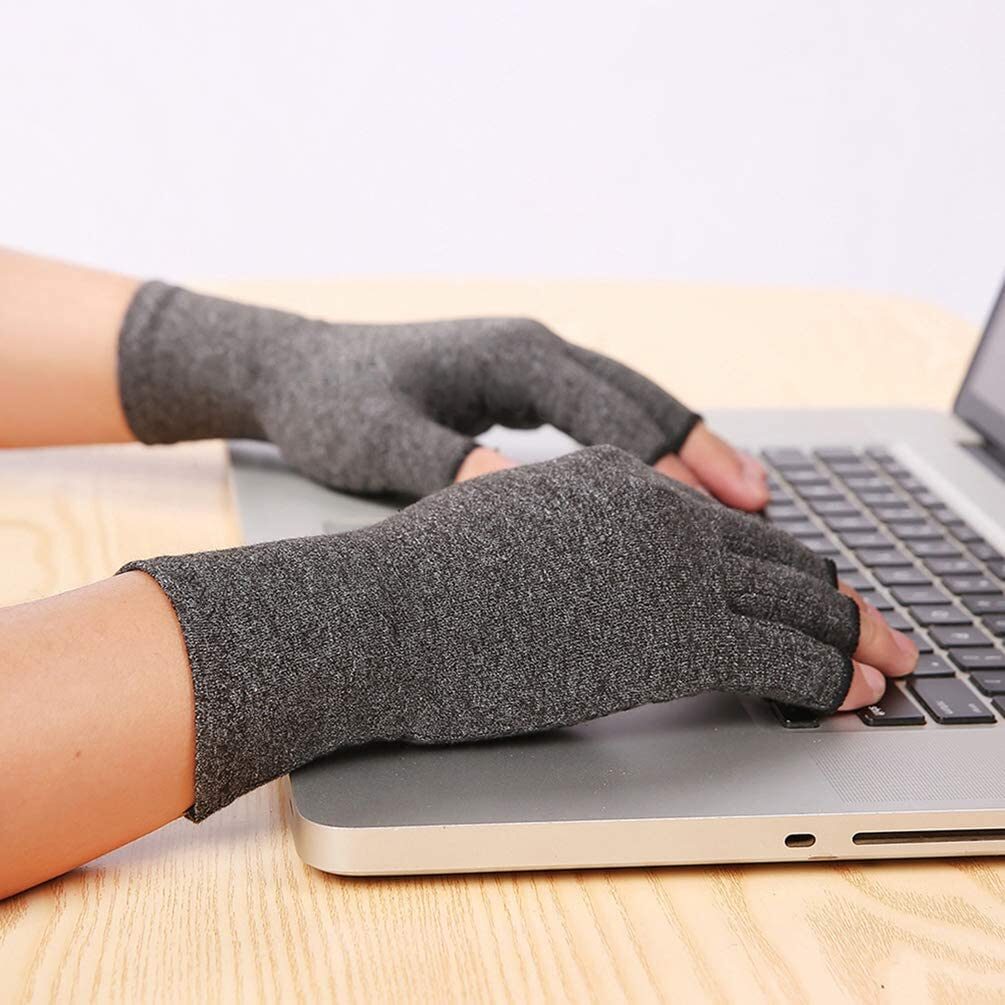
- 1 x pair of NuovaHealth Typing Gloves to help prevent cramp and ease tired, aching hands during long periods of keyboard and mouse use
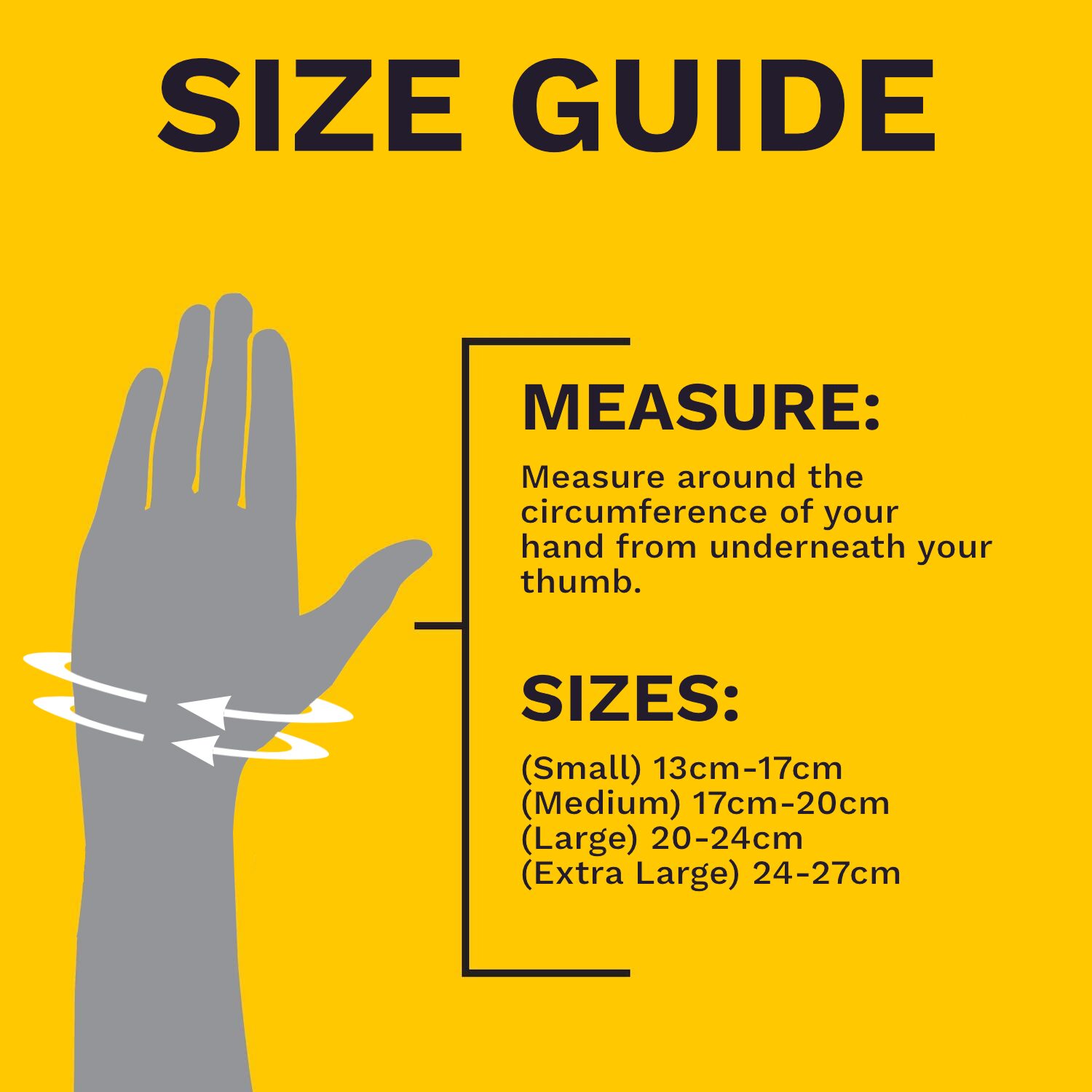
- Unisex design for adults, available in three sizes: Small (13–17 cm), Medium (17–20 cm) and Large (20–24 cm) – measure around the widest part of your hand (excluding the thumb) for the best fit
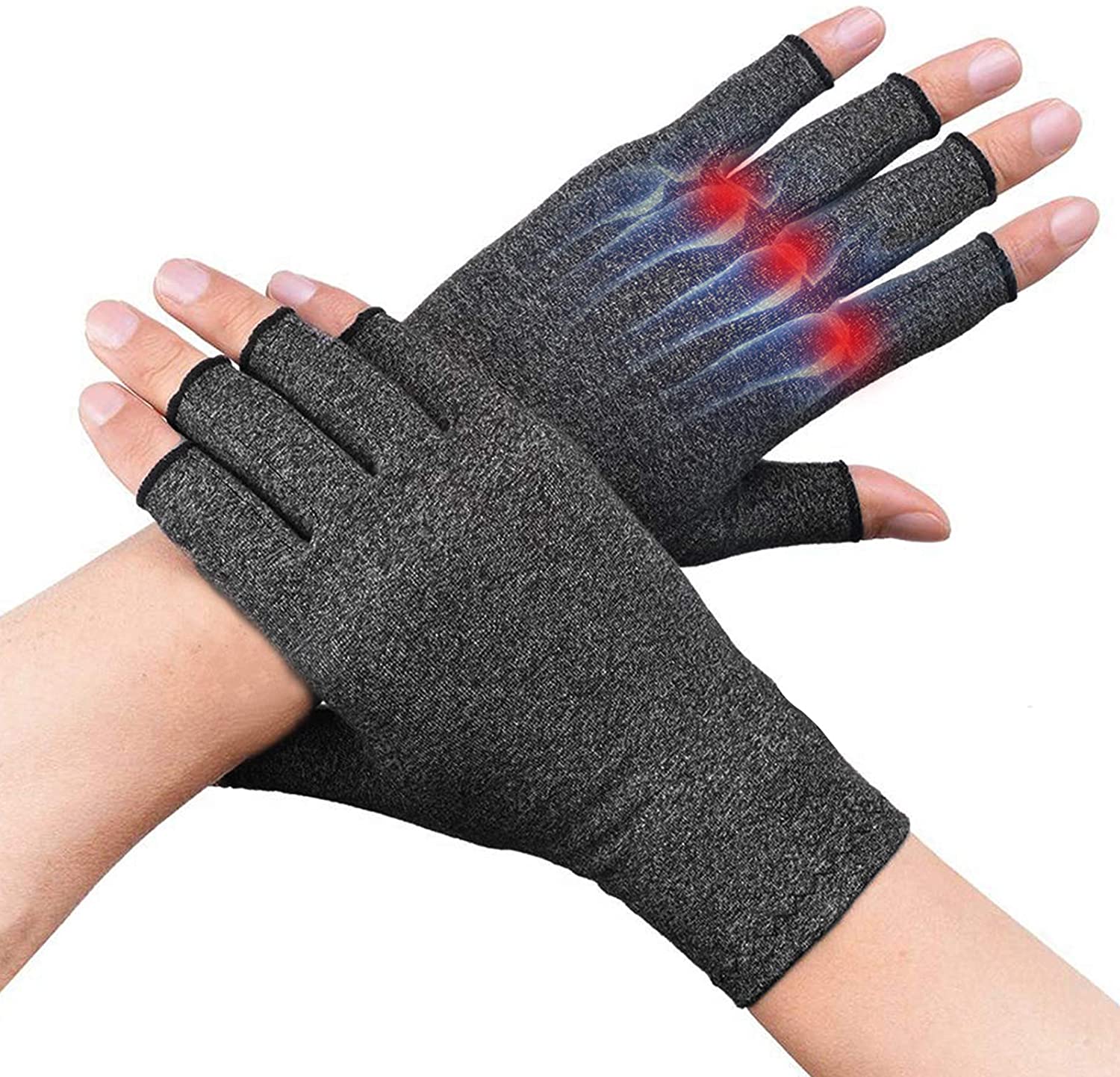
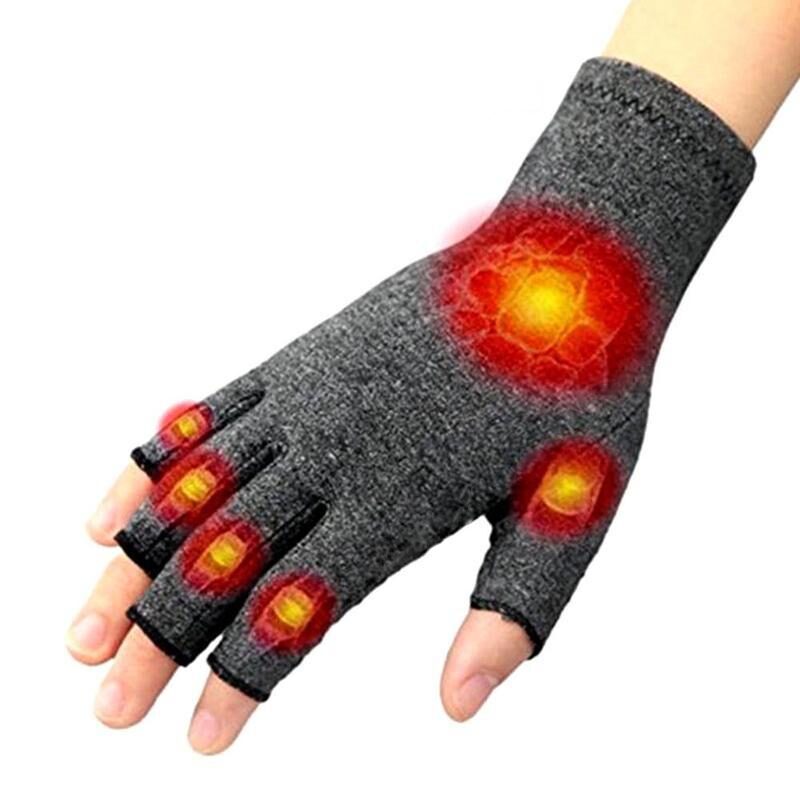
- Gentle, even compression to support overworked hand and forearm muscles and tendons, helping to ease deep aches, reduce fatigue and support the body’s natural recovery
- Light joint support around the knuckles and base of the thumb to reduce strain on sensitive joints while you type or use a mouse
- Designed to improve comfort and mobility in the hands, reduce stiffness and make repeated typing and mouse work feel less harsh
- Often recommended alongside care for problems such as osteoarthritis, rheumatoid arthritis, Raynaud’s‑type cold‑sensitive hands, oedema (swollen hands), pins and needles, fibromyalgia, tendonitis, carpal tunnel‑type symptoms, muscle cramps, hand sprains and other repetitive strain‑type issues
- Soft, skin‑friendly, breathable and lightweight fabric that helps keep the hands warm without overheating and allows moisture to escape
- Backed by a 30‑day money‑back guarantee if you are not satisfied with your purchase
If you spend long hours at a keyboard or using a mouse, you’ll almost certainly notice it in your hands at some point. The ache might build gradually through the day. Your knuckles feel tired, your fingers seem heavier, and by the last hour of typing, every keystroke takes more effort than it did when you sat down. For other people, the problem shows up first thing in the morning or after any prolonged break from work. Your hands feel stiff and clumsy, and it takes a few minutes of gentle movement before your fingers loosen up properly.
You might also feel a sudden sharp twinge when you press certain keys, or a nagging soreness right where your thumb meets your wrist — often linked to long hours on a mouse. Some people describe cramp-like sensations in the palm, or a sense that their hands tire far sooner than they should. Sometimes the problem isn’t an ache at all. You might notice tingling, numbness, or a burning feeling in a few fingers, and that’s worth paying attention to because it often means a nerve is irritated. Where you feel those sensations can help identify which nerve is involved and where pressure is building.
A single stiff, sore day after an unusually heavy workload is normal, and it usually settles with rest. The real concern is a pattern that keeps returning: discomfort on most days, symptoms that have lingered for weeks or months, or a feeling that things are slowly getting worse. When that happens, the muscles, tendons, and joints in your hands are struggling to keep up with what you’re asking of them. Understanding why is the first step towards fixing it.
What is happening inside your hands and wrists
Every finger movement depends on a chain of small muscles in your hand and forearm. These muscles pull on long, smooth cords — tendons — which cross your wrist and attach to the bones in your fingers. A single key press needs only a tiny amount of force, but in an hour of steady typing you might make thousands of them. Do that day after day, and each press is tiny, but after thousands of presses the total strain is far more than you’d expect.
There is also a less obvious strain happening at the same time. To keep your fingers poised over the keyboard, ready to move, you hold them slightly curved. That keeps the muscles working gently, even between keystrokes, so your hands rarely get a complete rest during a working day. When you type for long stretches without giving your hands enough break time, muscles tire, the tendons and the protective layers around them become irritated, and you start to feel the consequences: heaviness, soreness, stiffness, and a sense that even simple keystrokes take more effort than they should.
Your joints also take part of the strain. The many small joints in your fingers and thumb allow the precise movements that typing and mouse control depend on, but they are not built for hours of uninterrupted repetition. With age, or sometimes simply through years of intensive use, the smooth cartilage that covers the ends of the bones inside a joint can become thinner and less even. That is the change behind osteoarthritis. When the cartilage is no longer as smooth as it should be, the joint becomes stiff and less tolerant of sustained work. The joint where your thumb meets your wrist is especially vulnerable, because it carries a heavy load every time you grip, pinch, or hold a mouse.
Nerves can also be the source of the problem. Several important nerves run down from your forearm, pass through tight tunnels at the wrist, and branch out into your hand, carrying feeling and controlling movement in your fingers. If one of those nerves gets squeezed, you feel tingling or numbness in the area it serves. Holding your wrist in an awkward position for long periods, or leaning your forearm against a hard desk edge, increases pressure on these delicate structures. Repetitive hand movements can add further irritation, and over weeks that steady pressure can turn into a more persistent problem.
Blood flow matters as well. Your hands lose heat quickly when they are still, especially in a cool office. The small blood vessels in your fingers narrow to slow down that heat loss, leaving your hands feeling cold and a little numb. If your hands tend to run cold, that adds another layer of discomfort, because cold hands are stiffer and less responsive.
These issues rarely exist in isolation. A demanding day of repetitive work can inflame tendons while also increasing pressure on a nerve. If you already have arthritis in your knuckles, those joints are less able to handle the same workload. And poor circulation can make everything feel worse, because cold tissues are stiffer and slower to respond. But most desk-related hand strain comes down to the same habit: working for long stretches without giving your hands enough time to recover.
What makes it worse: your desk, your equipment, and how your day runs
The way your workstation is arranged has a direct effect on what is happening inside your hands. If your keyboard sits too high, you lift your shoulders and bend your wrists back to reach the keys. Set it too low and you’ll slump forward with your wrists bent downwards. Both positions place unnecessary pressure on the tendons and nerves passing through your wrist. The goal is a keyboard height that lets your forearms rest roughly parallel to the floor, with your elbows relaxed at your sides and your wrists in a straight line.
Your mouse matters just as much. When it sits too far to the side, you have to stretch for it, which twists your wrist and makes your shoulder work harder than it should. If your thumb has to stretch or grip awkwardly, the joint at its base — and the tendons running along the thumb side of your wrist — bear the brunt. A mouse that sits close enough for your arm to rest in a natural line, and that fits your hand comfortably, removes a great deal of avoidable strain.
A less obvious cause is the desk surface itself. If you rest the underside of your wrist or the edge of your palm on a hard edge for minutes at a time, you are pressing directly on the soft tissues and nerves. By the end of a long day, that steady pressure can cause the same tingling and numbness as a nerve squeezed at the wrist.
How you break up your working time matters more than most people assume. Long, unbroken spells at the keyboard give the muscles and tendons in your hands no chance to recover. The irritation builds because they are never allowed to settle. A short pause every thirty to forty-five minutes gives those tissues a moment to recover before they become seriously strained. Your break doesn’t need to be long. Let your hands rest in your lap, open and close them gently, straighten each finger in turn, and rotate your wrists in comfortable circles. Even a minute or two of this can break the cycle.
It would be misleading to blame your desk alone. Hobbies that keep your hands busy — playing an instrument, crafting, gaming, DIY — put extra strain on the same muscles and tendons you use all day. If your hands are active for most of your waking hours, they never get a real chance to settle. If you don’t give them time to recover, the discomfort is likely to spread beyond working hours and affect everyday activities.
Which pattern sounds like you?
Hand strain doesn’t always feel the same. It can be a dull ache, a sharp twinge, a sense of numbness, a catch when you bend a finger, or stubborn stiffness that takes time to ease. The sections below describe the most frequent patterns seen in adults who spend long hours at a keyboard or using a mouse.
Read through them and see which one fits what you’re feeling. Each section explains what’s likely happening inside your hand, why typing and mouse work tend to make it worse, what you can do about it day to day, and when it’s worth seeking professional advice.
It’s common to find more than one pattern that sounds familiar. These sections are a starting point for understanding your hands — not a final diagnosis. If you’re in any doubt about what’s going on, the safety section later in this guide gives clear guidance on when to speak to a doctor or hand therapist.
The common patterns
Below are the patterns most people recognise. At the end of each one, we’ll be straight with you about whether a daytime support glove is worth considering for that particular problem — and what it can and cannot do.
Tingling or numbness in your fingers during or after computer work
This pattern is hard to miss. You might wake in the night with your hand feeling numb or burning, or find yourself shaking your hand out halfway through a long typing session to try to bring it back to life. That familiar “pins and needles” sensation is your body telling you that a nerve is being squeezed.
The nerve in question is called the median nerve. It runs down your forearm, passes through a tight tunnel at the front of your wrist, and then splits into branches that supply feeling to your thumb, index finger, middle finger, and part of your ring finger. The tunnel is narrow and does not give the nerve much spare room. If the tendons next to it become swollen, or if you hold your wrist bent for a long time, the tunnel becomes even tighter. That pressure on the nerve is what produces the tingling, numbness, or burning.
Typing and mouse work can easily make this worse without you realising. Bending your wrist up or down narrows the tunnel further. Resting the underside of your wrist on a hard desk edge presses directly on the same area. And repeated finger movements can make the tendons swell slightly. The swelling takes up yet more space, and the symptoms creep in gradually.
The timing of the symptoms is often a useful clue. You might feel a faint buzzing that builds as the day goes on, or notice that your hand feels clumsy and less coordinated. Waking at night is very common, because your wrist often falls into a bent position while you sleep. Many people find they need to shake the hand or hang it over the edge of the bed to get the feeling back.
If the nerve stays squeezed for a long time, the symptoms can become more continuous. Weakness in the muscles at the base of your thumb, a feeling that your hand is losing coordination, or difficulty holding objects securely are all signs that the nerve is under significant pressure. These should not be ignored, because the sooner you act, the better the chance of preventing long-term damage.
Day-to-day management centres on keeping your wrist in a reasonably straight line during work. Adjust your chair and keyboard height so your forearms are roughly horizontal. Avoid resting your wrist on a hard desk edge. Place the mouse close enough that you don’t have to reach for it. And take short, regular breaks to let the tissues settle before they become seriously irritated.
If the tingling or numbness is frequent, wakes you regularly at night, or is accompanied by weakness or clumsiness in your hand, speak to your GP (your local doctor) or a hand therapist — a specialist who assesses and treats problems in the hands, wrists, and forearms.
Could a glove help with this pattern? A support glove cannot widen the tunnel or cure a compressed nerve, so it should never replace proper medical advice. But if your symptoms are mild and mainly appear during the day, wearing a snug, fingerless glove may help by keeping your hand warm and giving you a gentle reminder not to bend your wrist into awkward positions while you type. If you have active numbness, weakness, or night-time symptoms, get professional advice before trying one.
Aching, stiff, or swollen finger joints and thumb base
If your finger joints or the joint at the base of your thumb have become achy, stiff, or swollen after computer work, osteoarthritis may be part of the picture. This is not the familiar idea of simple “wear and tear,” as if the joint has been rubbed away. What actually happens is that the smooth, slippery cartilage covering the ends of the bones inside the joint becomes thinner and less even. When that happens, the two bones that meet at the joint no longer slide over each other as smoothly, so movement feels stiffer and less comfortable than it used to.
The pattern of symptoms is often distinctive. Stiffness and discomfort tend to be worst when you first start using your hands after rest, whether that is first thing in the morning or after a lunch break. As you begin to move, the joints often loosen up a little, because movement helps circulate the fluid that nourishes them. But if you keep typing or using the mouse for a long stretch without a pause, the ache tends to return and build. By the end of the day, your knuckles or the base of your thumb may feel sore, tired, or visibly puffier than they did in the morning.
Typing and mouse work send a surprising amount of force through these small joints. Every key press sends a small shock through your finger joints. Gripping a mouse requires sustained pressure through your thumb and fingers, and scrolling or clicking concentrates that force on particular joints again and again. If those joints already have osteoarthritic changes, they are less able to absorb the repetition without complaining.
The joint where your thumb meets your wrist deserves special attention. It carries a heavy load every time you grip or pinch something, and it is a common site for osteoarthritis. People who spend much of the day on a mouse or trackpad often notice a deep ache here by the end of the day. You might also feel a sharp twinge when you try to pick up a cup or turn a key.
Managing osteoarthritis in your hands is about finding a balance. The joints benefit from gentle, regular movement, but they don’t tolerate long, unbroken periods of repetitive work. Adjust your keyboard so your wrists and fingers sit in a relaxed position. Choose a mouse that doesn’t require a strong pinch between your thumb and fingers — the kind of grip you use when holding a key between thumb and index finger. And avoid hammering the keys, because every unnecessary impact travels straight through to the joint. Short, regular breaks to open and close your hands, straighten each finger, and move your thumb as far as it will comfortably go can ease stiffness and slow the build-up of pain as the day goes on.
Some people find that light compression and warmth around the affected joints make everyday computer work more comfortable. Warmth is often welcome because arthritic joints tend to feel worse in the cold and easier when they are warm. If your finger or thumb joints are persistently swollen, becoming more knobbly, or painful enough to limit everyday tasks, it is worth speaking to your GP or a hand therapist for a proper opinion.
Could a glove help with this pattern? The glove won’t change the joint itself, but the gentle warmth and light pressure around your knuckles and thumb base can make repeated keystrokes feel less jarring through the day. If you have significant swelling or very painful joints, check with your GP or hand therapist first to make sure a snug glove won’t irritate things further.
Dull aches and heaviness in your hands and forearms after long typing sessions
Some hand problems build quietly rather than announcing themselves with a sudden twinge. You might feel perfectly fine when you sit down at your desk in the morning. But after a few hours of steady typing, the backs of your hands or the area around your wrists begin to ache. If you keep going without a break, the pain can become sharper in particular fingers, your forearms may feel heavy, and the small muscles between your thumb and index finger can feel tight and sore.
This broad group of problems is often called repetitive strain injury, or RSI. The name is not a precise diagnosis, but it describes a common sequence: the same muscles and tendons are used over and over, with too little variety or rest, until they become irritated.
The irritation usually develops in the fleshy parts of your hand and forearm that work hardest during typing. When muscles tighten thousands of times in a session, tiny amounts of tiredness accumulate. If you don’t give them enough time to recover, that tiredness turns into soreness. The tendons that cross your wrist can also become inflamed, and the protective layer around each tendon may swell. That swelling takes up space and makes each subsequent movement more likely to rub or catch.
Tasks that demand long stretches of fast, high-focus work tend to bring symptoms on more quickly. Long runs of data entry, extended coding sessions, or writing under deadline pressure are common triggers. Mouse-heavy work that requires small, careful movements, such as detailed design work or navigating complex software for hours, can have a similar effect.
The underlying issue is always the balance between how much work your hands are doing and how much time they get to recover. In the early stages, you might only notice symptoms after unusually busy days, and they settle once you rest. As the strain continues over weeks or months, symptoms tend to appear earlier in the day and take longer to fade. Tasks that once felt comfortable may start to become uncomfortable much sooner, even if your working hours haven’t changed. That shift is often the first sign that you need to change your approach.
Hobbies that keep your hands busy — playing an instrument, crafting, gaming, DIY — put extra strain on the same muscles and tendons you use all day. A quiet weekend can give your hands a chance to recover, but if every day is hand-heavy, the problem may never fully settle.
Managing this type of strain usually requires several changes at once. Reducing long, uninterrupted typing sessions is central. Break large tasks into shorter blocks and pause regularly so the muscles and tendons can recover before they become seriously irritated. Share the workload between keyboard and mouse where you can, use keyboard shortcuts sensibly, and delegate the heaviest typing tasks when possible.
Adjusting your physical workspace helps too. Keep your keyboard at a height where your shoulders can relax and your wrists stay reasonably straight. Place the mouse close enough that you don’t have to reach for it, and consider trying a different mouse shape if you use one for many hours each day. A change in shape can alter how the work is distributed across the muscles and tendons.
If the pain, weakness, or coordination problems are getting worse despite reasonable adjustments, or if the discomfort is present even on days when you are not using the computer much, it’s worth speaking to your GP or a hand therapist.
Could a glove help with this pattern? This is the pattern where a daytime support glove is most likely to make a real difference. If the main problem is tired, heavy muscles after long sessions, the snug contact of the glove gives those muscles steady support while they work — rather like a supportive bandage on a tired calf. It won’t reduce your workload, but it can make the same amount of typing feel less punishing.
Pain, swelling, and stiffness in several joints, sometimes with general tiredness
Inflammatory forms of arthritis, such as rheumatoid arthritis or psoriatic arthritis, behave very differently from osteoarthritis. The problem is not wear and tear on the cartilage. It is your immune system mistakenly attacking the lining inside your joint, which is called the synovium. That lining becomes inflamed — meaning it swells, feels warm, and is painful to move. The joint fills with extra fluid, and the surrounding tissues can thicken. That is why affected joints feel hot, swollen, and very tender during a flare — a period when your symptoms suddenly become much more active and painful.
The impact on typing and mouse work can be considerable. You might wake with marked stiffness and pain in your hands, and it can take a long time before your fingers feel loose enough to rest comfortably on the keyboard. The first few keystrokes of the morning may feel painful and stiff. As the morning goes on, movement often becomes easier, but if you type for long periods, tiredness and aching tend to build again. By later in the day, your hands can feel swollen, heavy, and reluctant to move quickly.
Inflammatory arthritis often affects several joints on both sides of the body, rather than just one or two. It can also be accompanied by a general feeling of being worn out, which makes it harder to sustain the same pace of work you are used to. Because the underlying problem is in your immune system, it needs medication prescribed by a doctor to control inflammation and protect the joints over the long term.
During flares, even light key presses or gentle mouse movements can be uncomfortable because the joint tissues are so irritable. Your hands have a much lower tolerance for repetitive work, and a day at the computer that once felt routine can now push the joints to their limit.
Management relies heavily on appropriate medical treatment. Medicines aimed at calming the immune system help control joint inflammation and limit long-term damage. Physiotherapy can help you maintain movement and strength. Occupational therapy can show you ways to manage daily tasks without causing more strain.
Within that medical framework, practical adaptations can help. Spread keyboard work into shorter blocks rather than long stretches. Plan demanding tasks for times of day when your joints feel at their best. And choose a keyboard or mouse that requires less force to operate, so your fingers and thumb don’t have to work as hard. During flares, it may be necessary to cut back on typing, delegate tasks, or use alternatives such as voice input until the flare settles.
If you have inflammatory arthritis and you’re considering additional support for daytime comfort, mention it to your rheumatology team, GP, or therapist before making any changes. A sudden, marked increase in pain, swelling, heat, or redness in the joints that doesn’t settle should prompt a call to your healthcare professional.
Could a glove help with this pattern? This one needs more care. Because inflammatory arthritis involves active swelling and warmth, adding a snug glove could make things worse during a flare. The right first step is to speak to your rheumatology team or GP. If they agree light support could be helpful on gentler days, the glove might provide comfort and warmth — but only with their go-ahead.
Fingers that turn white, blue, or red in the cold
For some people, the main problem during computer work is not pain but persistent coldness. You might notice your fingers turning pale or changing colour within minutes of settling down to type in a cool room. They may feel numb or tingle as they sit still on the keyboard, and they take a long time to warm up again once they have chilled. In more noticeable cases, individual fingers turn white, then blue, then red, particularly when exposed to cold air or a cold surface. This pattern is often called cold-sensitive hands, and for some people it is part of a condition known as Raynaud’s phenomenon.
The small blood vessels in your hands control blood flow by widening or narrowing. In cold conditions, they narrow to reduce heat loss, which is a normal response. In someone with Raynaud’s, those blood vessels narrow more severely and stay narrowed for longer. The reduced blood flow makes your fingers feel cold, numb, and sometimes painful, and it can take a long while for colour and feeling to return once your hands warm up.
Cold-sensitive hands can feel slow and clumsy at the keyboard, as if your fingers can’t quite find the right keys. Some people notice that the moment they stop moving for a short period, their hands start to cool and stiffen, even though the rest of their body feels perfectly warm. Reaching for a mouse or typing for more than a few minutes in a draughty room may be enough to trigger colour changes.
Sitting still for long periods doesn’t help, because there is little muscle activity to keep blood flowing and heat moving through your hands. Hard, cold surfaces can make the problem worse, especially if your skin is in direct contact with a bare desk or a metal keyboard edge. Cold tissues are stiffer and slower to respond, and stiff hands are more likely to feel awkward and clumsy at the keyboard. Even without an underlying joint or tendon problem, the cold itself can cause a deep ache through the hands.
Managing cold-sensitive hands at a desk usually comes down to three things: keeping the room at a reasonable temperature, avoiding direct contact with cold surfaces, and moving regularly to encourage blood flow. Using a mouse mat, avoiding metal edges, and taking short breaks to gently open and close your hands can all make a meaningful difference.
If you’re experiencing frequent or severe colour changes in your fingers, along with pain, or if cold sensitivity occurs alongside joint pain, skin changes, or other general symptoms, it’s important to seek medical advice. A GP or specialist can assess whether there is an underlying condition and whether treatment is needed.
Could a glove help with this pattern? The glove traps a layer of warm air next to your skin, which can help keep your hands more comfortable during desk work. But it is not a treatment for circulation problems, and it should not be used on fingers that are actively changing colour or in pain. Medical advice is still the most important step for cold-sensitive hands.
Pain at the base of your thumb or along the thumb side of your wrist
Pain at the base of your thumb, or along the thumb side of your wrist, is a common complaint among people who use a mouse, trackpad, or similar pointing device for much of the day. Typing might feel perfectly comfortable, but gripping the mouse, scrolling, or repeating thumb gestures quickly brings on an ache or a sharp twinge.
The area where your thumb meets your wrist is a busy one. It works hard every time you grip, pinch, or move your thumb across your palm. Two structures are commonly involved. One is the joint at the very base of the thumb, which is a frequent site for osteoarthritis. The other is the group of tendons that run along the thumb side of your wrist and help lift your thumb away from your palm and move it out to the side. Irritation of these tendons is sometimes called De Quervain’s tenosynovitis.
During mouse use, your thumb is often held slightly out to the side and somewhat straightened. You may use it to press buttons, work a scroll wheel, or perform swipe gestures across a trackpad. If the mouse doesn’t fit your hand well, or if it is positioned so that you have to stretch to reach it, the strain on these structures grows.
The location of the pain can give you a clue about which structure is mainly involved. If the joint is the source, the discomfort is often felt deep at the base of the thumb, especially when you pinch or grip something. If the tendons are the problem, the soreness may be sharper along the thumb side of your wrist, and it may be triggered when you lift your thumb away from your palm or twist your wrist.
Days with a lot of mouse work tend to bring these symptoms on more quickly. Over time, a dull ache around the base of your thumb can build, and it may be joined by sharper pains during particular movements. Osteoarthritis at the base of the thumb is more common from middle age onwards, while tendon irritation can appear at any age if repetitive thumb movements or awkward wrist positions are a regular part of your day.
Managing this kind of pain starts with changing how your thumb is used. Choose a mouse that fits your hand comfortably, so your thumb can rest in a relaxed position rather than stretching or gripping hard. Position the mouse so your arm and wrist sit in a natural straight line. Some people find that a vertical mouse or a trackball reduces strain, because these devices change how much the thumb has to move and how far it must reach. Using keyboard shortcuts and taking short breaks to rest and gently stretch the thumb can also stop the strain from accumulating through the day.
If the pain at the base of your thumb persists, is clearly getting worse, or is accompanied by significant swelling, it’s worth speaking to your GP or a hand therapist.
Could a glove help with this pattern? A glove with a snug fit around the thumb base can encourage a more relaxed grip on the mouse, and the gentle pressure and warmth may reduce the ache that builds through the day. But it won’t fix an underlying joint problem or severe tendon irritation. If the pain is sharp, persistent, or getting worse, get a professional opinion first.
A finger that catches, clicks, or locks when you bend it
Not every keyboard-related hand problem involves aching or tingling. Some people notice that a finger starts to catch, click, or briefly lock in a bent position while moving between keys. It can be painful, and it often makes you wary of using that finger at all.
In the early stages, you might only notice the catching after a long typing session, when the finger is already tired. Over time, it can begin to happen more often, during other everyday tasks such as gripping a steering wheel, carrying shopping bags, or opening jars. Many people notice that the affected finger is particularly stiff, or even stuck in a bent position, when they wake in the morning. It then gradually frees up as they move it.
This problem is usually called trigger finger. It involves the tendon that bends the finger. Normally, that tendon glides smoothly through a series of small bands, called pulleys, which hold it close to the bone along the palm side of the finger. If the tendon becomes slightly thickened, or the pulley becomes irritated and roughened, the tendon struggles to glide through that tight spot. The tendon then catches on the rough spot as it slides. That is what you feel as a click, a snap, or a lock.
Repeated gripping and bending of the finger, such as continuous typing or other hand-intensive work, increases the strain on this tendon-pulley system. If the tissues there are already thickened or sensitive, repeated motion makes them rub together more, which increases the catching. Trigger finger is more common in middle-aged adults and in people whose hands are used for strong gripping and pinching. It is also more frequent in some conditions, such as diabetes and inflammatory arthritis.
During computer work, the affected finger — often the index or middle finger — may be responsible for a large share of the keystrokes. Even light key presses add up when repeated thousands of times in a single session, especially if your keyboard requires a firm press or your typing style is forceful.
If the catching is ignored and becomes frequent and painful, the finger can gradually grow stiffer and more reluctant to straighten fully. In more severe cases, it may spend much of the time in a bent position, which can make typing and everyday tasks genuinely difficult.
Managing trigger finger involves reducing the strain on the affected finger. Share the typing between fingers where you can, take more frequent breaks, and temporarily slow down when the symptoms are active. A keyboard with a lighter key action, or a keyboard position that allows your fingers to reach the keys without awkward stretching, can also reduce the strain.
If the catching is frequent, painful, or causing the finger to lock for longer periods, medical treatments such as injections or a small procedure to release the pulley may be discussed with you. If you notice regular catching or locking of a finger, especially if it is painful or interfering with your ability to type or manage everyday tasks, it’s worth speaking to your GP or a hand therapist.
Could a glove help with this pattern? The glove will not stop the tendon from catching, and it is not a treatment for trigger finger. If you are waiting for medical advice or treatment, the glove can provide general comfort and warmth during the day, but it should never be used instead of seeing a professional about the locking itself.
How the NuovaHealth typing glove fits into your day
If any of the patterns described in Part 1 sounded familiar, you might be wondering whether a support glove could help. The short answer is that it can — but only if you understand what it is actually doing. This glove is not a treatment for an underlying condition, and it will not change the number of keystrokes you make. What it can do is change how that workload feels on your hands. And for many people, that makes a real difference when they are spending hours at a keyboard.
What this glove is designed to do
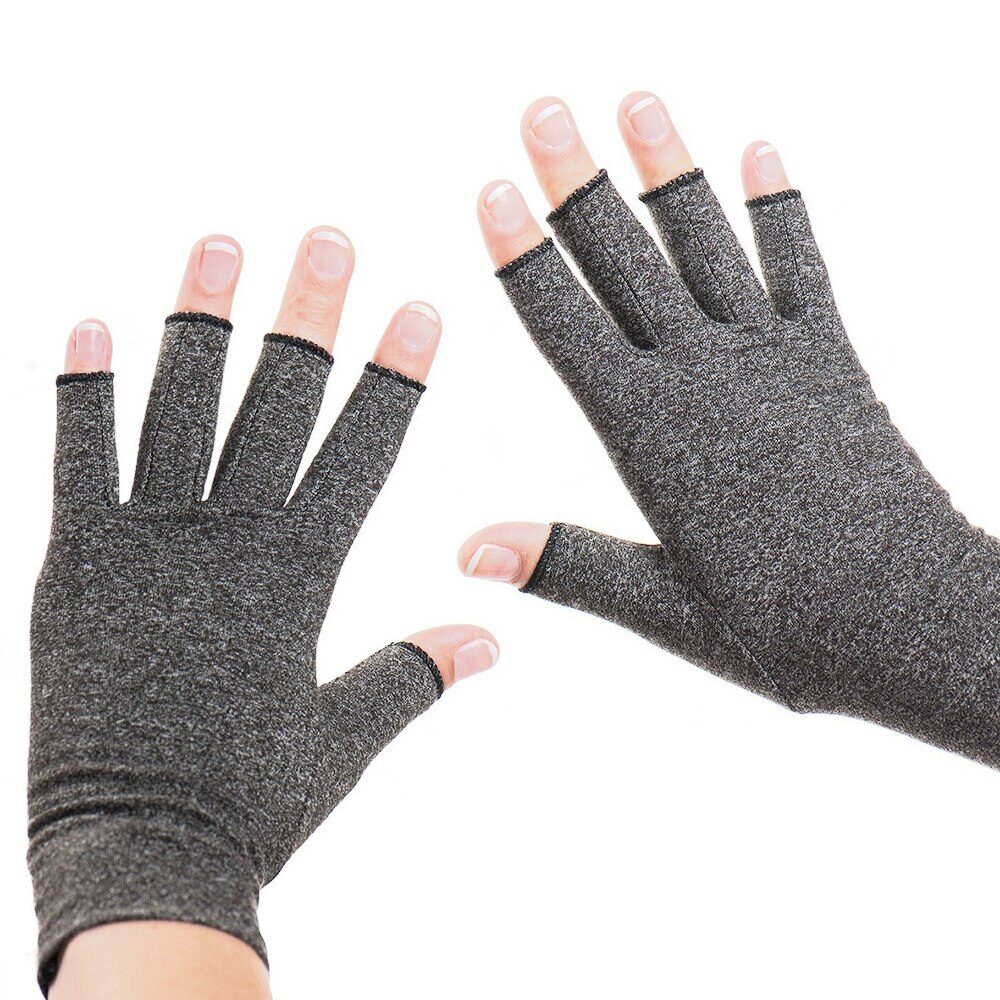
The glove is slim, close-fitting, and fingerless. It covers your palm, the back of your hand, your knuckles, and the area around the base of your thumb, while leaving your fingertips completely free. That matters for two reasons. First, you keep full sensitivity for feeling the keys, so the glove does not interfere with your typing. Second, it does not restrict the natural curve of your fingers when you reach for a key or rest on the mouse.
The main way the glove helps is through gentle, even pressure across the parts of your hand that work hardest during key presses. The small muscles that sit between the bones of your hand are active with every single keystroke — even the light ones. When those muscles have been working hard for hours, they begin to feel full, heavy, and tired. The glove gives them a steady, snug contact, rather like a supportive bandage on a tired calf muscle. It doesn’t switch the muscles off. It doesn’t stop them working. It simply provides a gentle, holding sensation that eases that sense of overwork and makes each keystroke feel less jarring.
The close fit around your knuckles and the base of your thumb also gives those joints a light, supportive squeeze. When you reach for a key or grip a mouse, the joints in your fingers and thumb are sometimes pushed towards the edge of what feels comfortable. The glove doesn’t prevent that movement, but it does give a subtle reminder to keep your hand in a more relaxed, natural position — wrist straight rather than bent sharply up or down, fingers gently curved rather than stretched flat. That position matters because awkward wrist angles and strained finger postures are major contributors to the irritation described in Part 1.
Another benefit is warmth. Your hands lose heat quickly when they are resting on a desk in a cool room. Cooler hands feel stiffer, more clumsy, and more prone to aching. The fabric traps a thin layer of air next to your skin, slowing down heat loss and helping your fingers stay supple. If you often notice your hands stiffening during long sessions, or if you tend to type more clumsily when your hands feel cold, that extra warmth can be a genuine comfort.
There is also a subtler effect worth knowing about. Because the glove fits snugly, it gives your skin steady contact. That helps your brain keep better track of where your hand is in space — a sense often called proprioception. In everyday terms, you become a little more aware of how your wrist and fingers are positioned. Many people find they naturally begin to hold their wrist straighter and keep their fingers in a more relaxed curve, without having to think about it.
Being honest about what this glove can and cannot do
No support product should ever be sold as a miracle cure, so let’s be straightforward about the limits.
This glove will not widen the tunnel that your median nerve passes through at the wrist. It will not reverse the thinning of cartilage in an arthritic joint. It will not stop a finger that is catching or locking. And it will not treat inflammatory arthritis. If you have any of those conditions, the right response is to follow the advice of the clinician who is managing your care. A glove is not a replacement for that advice, and it should never delay you from seeking medical help when you need it.
What the glove can do is more modest, but still valuable. It can make the same amount of typing and mouse work feel less punishing on the muscles, joints, and soft parts of your hand. It can ease the heaviness and tiredness that build up during a long stretch at the desk. And it can give your hand a steady, supportive contact that helps you keep working without discomfort turning into pain.
Who this glove is right for
You don’t need a formal diagnosis to try a typing glove. If your hands feel tired, achy, or stiff mainly after long spells at a keyboard — and the discomfort settles once you rest — then this glove is a reasonable thing to try. It is most likely to help if you recognise one of these situations:
- Your hands feel heavy and tired as the day goes on.
- Your finger joints or the base of your thumb stiffen after a long working block.
- You notice occasional tingling that settles quickly when you shake your hand or take a break.
- Your hands tend to get cold during desk work.
There are also times when it makes more sense to speak to a professional before buying any support. If your symptoms are severe, constant, or clearly getting worse, or if you have any of the warning signs described later in this guide, get advice first. That includes waking regularly at night with numbness, a finger that locks in a bent position, visible swelling and heat in your joints, or weakness that makes you drop things. A glove can be a useful comfort measure once you know what you are dealing with, but it is not a substitute for a proper check-up.
If you have a known condition such as carpal tunnel syndrome, Raynaud’s, or inflammatory arthritis, check with the clinician who manages that condition before using the glove. They can confirm whether gentle pressure is appropriate for you, particularly if your symptoms are active at the moment. In short: a quick conversation can save you a lot of worry later.
Choosing the right size and fit
The gloves come in three sizes. To find yours, you need to measure the circumference of your hand at its widest point — that is, around your knuckles, keeping your thumb out of the measurement. Use a flexible tape measure and read the number in centimetres.
- Small: hand circumference 13–17 cm
- Medium: hand circumference 17–20 cm
- Large: hand circumference 20–24 cm
A correct fit should feel snug but not tight. Your fingers should be able to move fully. No seams should dig into your skin. And the glove should never feel as though it is cutting off circulation. If the glove is too loose, it won’t provide the even pressure that gives you the support you need. If it is too tight, it could actually cause more tingling or discomfort than it prevents — so it’s worth checking carefully before you commit.
A quick test: try sliding one fingertip under the cuff at the wrist. If it slides in easily, the fit is probably right. If you can’t slide it in at all, the glove is too tight. If you can move the fabric around freely over the back of your hand, it is too loose. If you are between sizes, choose the larger one.
Wearing the gloves day to day
The gloves are designed to be worn while your hands are actually working. That means the most practical approach is to put them on at the start of a block of typing or mouse work and keep them on until you take a proper break. You don’t need to wear them all day, and there is no benefit to wearing them while your hands are resting in your lap. Save them for the parts of your day when your hands would otherwise start to complain.
If you have never worn this type of support before, start gradually. Wear the gloves for an hour or two on your first day, just to let your hands get used to the feeling of gentle pressure. Then build up to longer periods over the following days. This gives your hands time to adjust, and it also gives you a chance to confirm that the fit stays comfortable through a full working session — not just in the first few minutes. Some people prefer to begin with the glove on the hand that bothers them most, then decide later whether wearing both gives more balanced relief.
One thing to be clear about: these gloves are not designed for overnight wear. If you wake with tingling or numbness in your hands, a night-time wrist splint is often the more appropriate support, and that is worth discussing with your GP or a hand therapist. The daytime pressure from these gloves is there to help you during activity, not to hold your wrist in a fixed position while you sleep.
To get the most benefit, pair the gloves with the break pattern described in Part 1. Pausing every thirty to forty-five minutes is one of the most useful habits you can build. The gloves work best when they are part of that routine, not a replacement for it. When you take your break, let your hands rest in your lap, open and close them gently, straighten each finger in turn, and rotate your wrists in comfortable circles. The glove can stay on during those movements — in fact, it may feel better to keep it on. What matters is that you move the joints and let the tired muscles reset.
Looking after the gloves is simple. Machine wash them on a gentle cycle with similar colours, then allow them to air dry. Avoid high heat, because it can make the fabric lose its shape and its supportive feel. With proper care, a pair should hold its pressure and shape for several months of everyday use. When you notice that the gloves no longer feel snug, or the fabric has begun to stretch out permanently, it is time to replace them. A glove that has lost its shape is no longer giving your hand the steady, even contact it needs.
Staying safe, knowing when to seek help, and making it all work together
Before you try the gloves, it is worth being clear about when they are a sensible idea and when you should pause and get advice first. The gloves are a support for day-to-day comfort during computer work. They are not a treatment for an underlying condition, and they will not sort out a problem that needs proper medical care.
When to speak to a professional first
If you have a known condition such as carpal tunnel syndrome, Raynaud’s, or any form of arthritis, check with the clinician who manages that condition before using the gloves. They can tell you whether gentle pressure is safe for you, particularly if your symptoms are flaring up at the moment. That conversation may feel like an extra step, but it is simple, and it protects you.
There are also certain warning signs that should never be ignored. If you recognise any of the following, book an appointment with your GP or a hand therapist before you think about buying any kind of support:
- The discomfort in your hands has been present on most days for several weeks, or it keeps coming back no matter what you try.
- The symptoms are getting worse over time, rather than staying the same or easing when you rest.
- You are waking at night with numbness, tingling, or burning in your hand, and you have to shake your hand to get the feeling back.
- Your hand feels weaker than it used to. You may be dropping things more often, or your fingers feel clumsy when you try to pick up small objects.
- One finger regularly catches, clicks, or locks in a bent position.
- The area where your thumb meets your wrist is painful when you grip or pinch, especially when there is visible swelling or tenderness.
- Your fingers change colour in the cold, turning white, blue, or red, and this is accompanied by pain or a feeling of numbness.
- Several joints in your hands are swollen, warm, and painful at the same time, particularly if you also feel unusually tired or unwell.
If any of these sound familiar, the right next step is to get a proper opinion from a clinician. They can examine you, work out what is actually going on, and point you towards the treatment that fits your situation. Acting early gives you the best possible chance of preventing a temporary issue from becoming a long-term problem.
There are also times when you should stop wearing the gloves and seek advice promptly. If you develop sudden severe pain, new swelling, significant bruising, or a clear loss of movement and strength, the gloves are not the answer. Likewise, if wearing them causes new tingling, numbness, a feeling of coldness, or any change in the colour of your fingers, take them off and speak to a clinician before trying them again.
How the gloves should not be used
These gloves are designed for daytime wear while your hands are active at work. They are not meant to be slept in. If you wake at night with tingling or numbness, a night-time wrist splint is often the more appropriate support, and that is worth discussing with your GP or hand therapist. The glove holds nothing in a fixed position, so it cannot hold your wrist straight while you sleep, and it is not a replacement for a proper splint.
You should also avoid wearing the gloves if they feel painfully tight, if they leave deep marks in your skin, or if they make your hands feel more numb or tingly rather than more comfortable. A support glove should never cause new symptoms. If it does, the fit may be wrong, or your hands may need a different kind of help.
How it all fits together
If you have read through the earlier parts of this guide, you will have noticed a pattern. The discomfort you feel after a long day at the keyboard is usually the result of several small problems adding up: muscles that are tired from repeated effort, joints that are being asked to work without enough recovery time, nerves that are sitting in a tight space, and sometimes hands that are simply cold. No single change fixes all of those at once. What works is a combination of sensible adjustments.
Start with the physical layout of your desk. Check your chair height. When you sit down, your elbows should be relaxed at your sides, your forearms roughly horizontal, and your wrists in a straight line – not bent sharply upwards or downwards. Position your keyboard so you do not have to stretch forward. Place the mouse close enough that your arm rests in a natural line, and choose one that fits your hand comfortably so your thumb does not have to stretch or grip awkwardly. Avoid resting the underside of your wrist or the edge of your palm on a hard desk edge for long periods. That constant pressure can squeeze the nerves in your wrist and make tingling and numbness much worse.
Then look at your pacing. The most effective habit you can build is to pause every thirty to forty-five minutes, even for just a minute or two. Let your hands rest in your lap. Open and close them gently. Straighten each finger in turn. Rotate your wrists in slow, comfortable circles. That break gives your muscles and tendons a chance to reset before they become seriously irritated. It does not need to be long, and it does not need to interrupt your flow. It simply needs to happen regularly.
Into that routine, add the gloves. Wear them during the blocks of heavy work – typing, mousing, coding, writing, designing – when your hands are working hardest. The glove provides a steady, snug contact across the muscles and joints that are doing the work. It keeps your hand a little warmer, and it helps you stay aware of your wrist position without having to think about it. Start gradually, check the fit is comfortable, and pair it with your regular breaks.
Try this approach for a couple of weeks. Many people find that the end-of-day ache is less intense, that mouse-related thumb pain is less sharp, and that their hands stay warmer and more comfortable in a cool room. The glove will not reduce your workload and it will not fix a badly arranged desk. But it will make the same amount of typing feel less punishing, and that is exactly what it is designed to do.
Recognising when self-help is not enough
There is only so much that a glove, a better desk setup, and regular breaks can achieve on their own. If your symptoms are severe, constant, or getting worse despite these measures, do not put off seeking advice. Hand problems are treatable, especially when you catch them early. A GP or a hand therapist can look at what is actually happening in your hand and wrist, confirm whether the problem is muscular, joint-related, or nerve-related, and suggest the treatments that fit your situation.
Left too long, some of these patterns can become more stubborn. A nerve that stays compressed for months is harder to settle than one that has only been irritated for a few weeks. A finger that has been locking for a long time is less likely to free up on its own. An inflammatory joint condition that goes untreated can cause damage that is difficult to reverse.
So by all means, try the practical steps described throughout this guide. Adjust your desk. Take the breaks. Wear the gloves during your heaviest working periods. But also pay attention to what your hands are telling you. They are giving you useful information about what is working and what is not. If a couple of weeks of sensible changes have not made a real difference, or if things are getting worse, the next step is to see a clinician who can assess what is going on and guide your treatment.
Important information and disclaimer
The information in this guide is intended as general guidance about common hand and wrist problems linked to keyboard and mouse use, and about how this NuovaHealth typing glove is designed to support day-to-day comfort. It is not a personal medical assessment, a diagnosis, or a treatment plan. You should not rely on it as a substitute for professional advice.
Hand pain, stiffness, tingling, catching, and cold sensitivity can have many causes. The descriptions in this guide cover the most common patterns seen in adults who use computers frequently, but they do not cover every possibility, and they cannot tell you what is happening in your specific situation. A glove like this may be a useful comfort measure for some people, but no particular result is guaranteed.
This product is designed for adults only. It is not intended to prevent allergic reactions. If you have concerns about skin sensitivity, circulatory conditions, or any diagnosed issue affecting your hands, please speak to a pharmacist, GP, or specialist before trying the product.
If you are experiencing ongoing, severe, or changing symptoms, or if you are worried about your hands for any reason, the right next step is to talk to a GP, physiotherapist, or another suitable clinician. They can give you advice based on your own situation and help you decide whether this type of support is appropriate for you.
7 Reviews For This Product
Fast & Secure Checkout Through Paypal
Pay with Paypal the secure payment gateway that accepts all credit and debit cards. Paypal is free and secure and no credit or bank information is ever stored or shared with us.
Fast Dispatch
Enjoy your items soon with quick dispatch via Royal Mail. Expect to have your items between 1-3 working days for domestic orders. 7-10 Working days for international orders.
Return Policy – 30 Day Money Back Guarantee
In the unlikely event, you are unhappy with your purchase you can return it within 30 days for a refund. Please contact us via the form on the contact us page to start your return.
To return an item please send it to: Nuova Health UK, 81 Highfield Lane, Waverley, Rotherham, S60 8AL. Please include a note with your order id so we know who to refund. Please retain your postage receipt as proof of postage. All that we ask is that the item is in the original packaging and unused.
by Mark
A great fit, really comfortable and they do stop my hands cramping up when typing on the computer at work. Buying another pair as we speak!
by Richard Chow
So far so good! These gloves have definitely stopped my hands aching so much when working (okay… playing games) on my laptop 👌
by Peter Hartley
An all-round good pair of compression gloves… just what I was looking for to stop my hands from seizing up as winter draws in and starts to bite.
by Karen Moore
Constant typing started to take its toll on my wrists and fingers. I was looking for relief, and that’s when I stumbled upon these typing gloves. I must admit, I was skeptical at first. But, boy, was I wrong!
The gloves fit snugly and provide a gentle compression to my hands and fingers, offering instant relief. It’s like a warm hug for my hands. The gloves are made from high-quality material that’s soft against the skin and doesn’t cause any irritation. I love how they have improved my typing speed and reduced the stiffness in my fingers.
I would’ve given it a full five stars, but it took a couple of days to get used to typing with gloves on. Now that I’m used to it, I can’t imagine typing without them! I recommend these gloves to anyone who spends long hours typing. You won’t regret it!
by Mo
I suffer from sore hands after long hours of typing. These gloves have been my go-to solution. They provide excellent compression and support, without being too tight. I’ve noticed a big reduction in my hand fatigue. The gloves are also quite durable. They do take some getting used to, but once you’re are, they’re a solid investment for your hands.
by Stevie Brown
I started feeling a constant dull ache in my fingers due to long hours of typing. I decided to give these gloves a shot. They’ve been quite supportive, easing the discomfort significantly. I’m able to focus better on my work now. A bit pricey, but given the relief they provide, they’re worth it
by Roy
I’m a graphic designer and a lot of my work involves digital drawing, so you can imagine how long I have to work on a computer. These gloves have given my hands some much-needed relief. It’s not a perfect solution but it’s a step in the right direction.